Tekno

Tinggal Copy-Paste: 10 Prompt Gemini AI Foto Strip Roblox Ala Photobox yang Lagi Viral

×

Tinggal Copy-Paste: 10 Prompt Gemini AI Foto Strip Roblox Ala Photobox yang Lagi Viral

Sebarkan artikel ini
Prompt Gemini AI
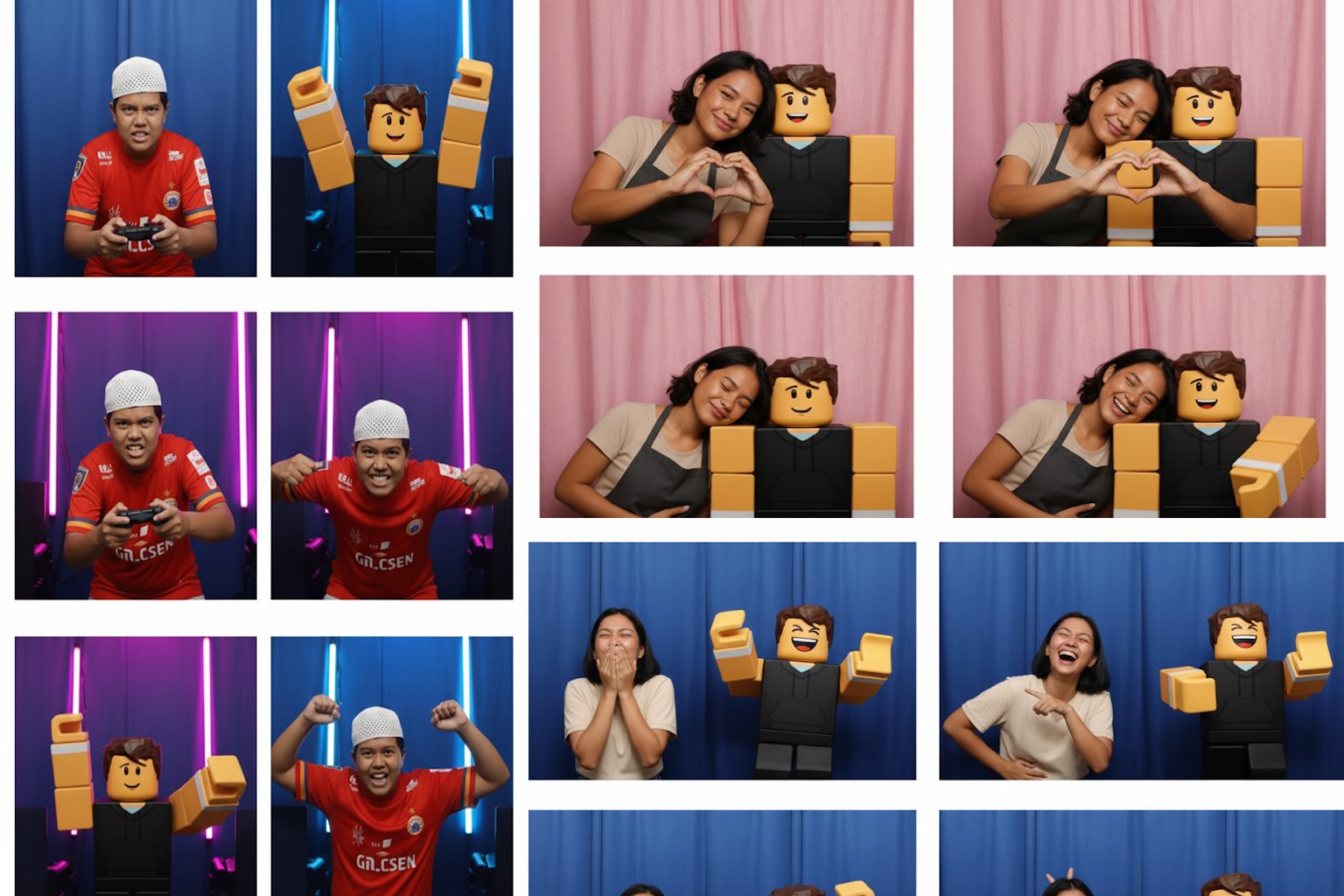
Contoh gambar Prompt Gemini AI Foto Strip Roblox Ala Photobox yang Lagi Viral

Topikseru.com – Prompt Gemini AI belakangan ini jadi kata kunci yang ramai diperbincangkan oleh para pengguna TikTok dan Roblox.

Tren terbaru yang sedang viral adalah membuat foto strip ala photobox bareng avatar Roblox favorit kita.

Bayangkan, seolah-olah kita benar-benar masuk ke dalam mesin photobox bersama karakter yang sudah lama kita bangun di dalam game. Hasilnya bukan hanya unik, tetapi juga estetik dan pastinya siap untuk dipamerkan di media sosial.

Artikel ini akan membahas secara lengkap cara membuat foto viral tersebut, mulai dari langkah-langkah teknis, contoh Prompt Gemini AI yang bisa langsung dicoba, hingga kumpulan ide kreatif yang akan membuat hasil fotomu berbeda dari orang lain.

Kenapa Prompt Gemini AI Bisa Jadi Viral?

Fenomena ini tidak muncul tanpa alasan. Ada beberapa faktor kuat yang membuat Prompt Gemini AI begitu cepat menjadi bahan perbincangan:

1. Memberi Sentuhan Kreatif yang Berbeda

Jika biasanya photobox hanya diisi dengan foto kita bersama teman, pasangan, atau keluarga, kini hadir inovasi baru: berpose bareng avatar game favorit. Hal ini menciptakan pengalaman visual yang unik, personal, dan tentunya berbeda dari tren sebelumnya.

2. Proses Praktis dan Mudah Diikuti

Tidak perlu kemampuan desain grafis profesional. Dengan hanya bermodalkan foto selfie, screenshot avatar Roblox, dan akses ke Gemini AI, semua orang bisa ikut tren ini. Prompt tinggal disalin, ditempel, lalu dihasilkan foto ala photobox dalam hitungan detik.

3. Hasil Foto Estetik dan Instagramable

Format 4 panel photobox dengan latar tirai sederhana membuat hasil foto terlihat natural. Tambahan avatar menjadikannya lebih seru dan pas untuk dibagikan di TikTok, Instagram, hingga Twitter/X.

4. Bisa Dikustomisasi Sesuai Kepribadian

Keunggulan Prompt Gemini AI adalah fleksibilitasnya. Kita bisa menentukan gaya, ekspresi, hingga background sesuai selera. Dengan begitu, setiap foto strip akan tampil berbeda sesuai kreativitas masing-masing pengguna.

Langkah-Langkah Membuat Foto Ala Photobox dengan Gemini AI

Agar hasil foto sesuai dengan tren TikTok, berikut panduan yang bisa langsung dipraktikkan:

  1. Siapkan Foto Diri Sendiri
    Pilih selfie terbaikmu dengan wajah terlihat jelas. Foto dengan pencahayaan bagus akan mempermudah AI mengenali detail wajah.

  2. Ambil Screenshot Avatar Roblox
    Masuk ke profil Roblox atau editor avatar, lalu ambil tangkapan layar avatarmu dari posisi depan. Pastikan avatar terlihat utuh dan tidak terpotong.

  3. Buka Situs Gemini AI
    Kunjungi halaman resmi di gemini.google.com/app.

  4. Unggah Kedua Gambar
    Klik ikon unggah gambar lalu masukkan dua file sekaligus: foto selfie dan screenshot avatar Roblox.

  5. Masukkan Prompt Gemini AI
    Inilah kunci utamanya. Tanpa prompt yang detail, hasilnya tidak akan maksimal. Tambahkan instruksi lengkap seperti format photobooth, gaya interaksi, hingga latar belakang.

  6. Klik Kirim dan Tunggu Hasilnya
    Dalam beberapa detik, Gemini AI akan menghasilkan foto strip 4 panel sesuai deskripsi yang kita masukkan.

10 Prompt Gemini AI untuk Membuat Foto Ala Photobox Bareng Avatar Roblox

Berikut kumpulan prompt Gemini AI terbaik yang bisa langsung digunakan. Setiap tema memberikan nuansa berbeda sehingga kamu bisa menyesuaikan dengan mood atau konsep yang diinginkan.

1. Photobox Korea Simple (Viral)

Prompt viral yang pertama kali ramai di TikTok.
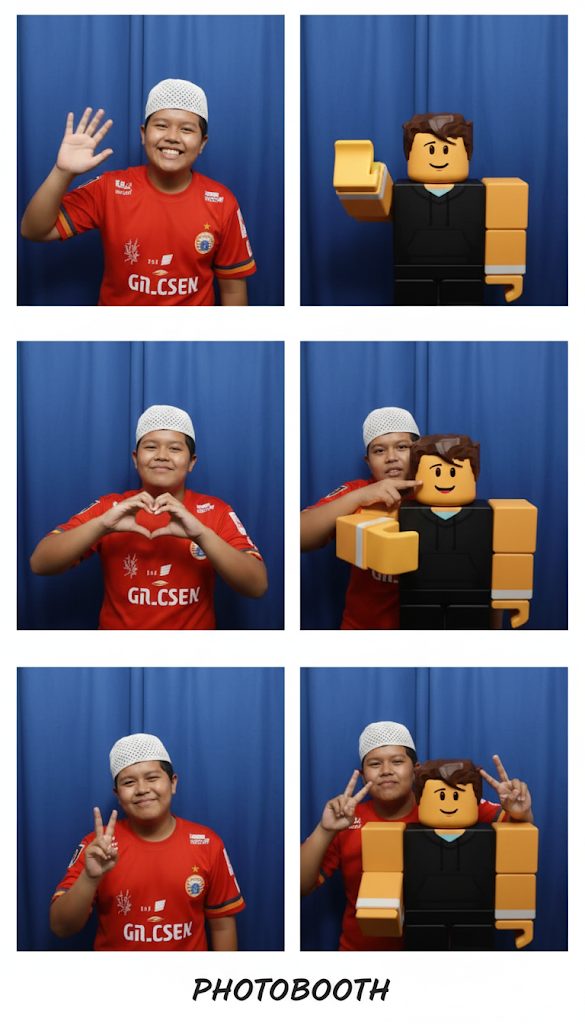
Prompt Gemini AI Photobox Korea Simple (Viral)

Create a 4-panel photobooth-style photo strip featuring the person from the first image and the Roblox avatar from the second image. The style should be fun and candid, as if they are friends taking pictures together inside a Korean-style photobooth with a plain blue curtain background. Do not change the face of the person or the appearance of the Roblox avatar.

In each panel, show a different fun pose:
– Panel 1: Both are waving at the camera.
– Panel 2: They are making a heart sign together with their hands.
– Panel 3: The person is playfully poking the avatar’s cheek.
– Panel 4: They are both giving a peace sign.

2. Bestie Kocak

Cocok untuk menampilkan persahabatan penuh tawa.
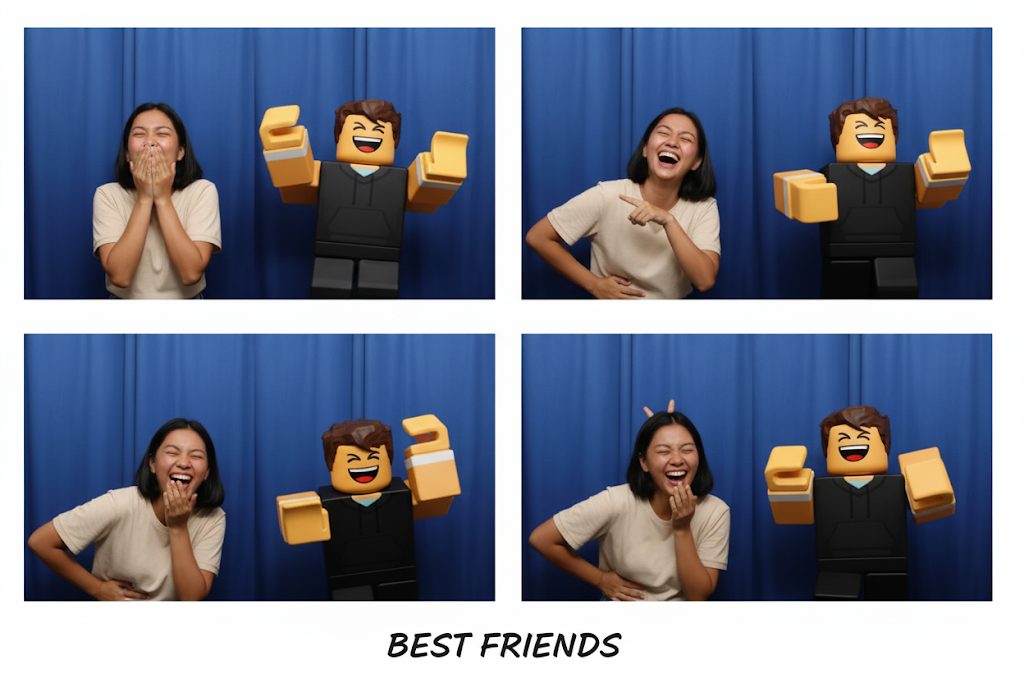
Prompt Gemini AI Bestie Kocak
Create a 4-panel photobooth-style photo strip of the person from the first image and the Roblox avatar from the second image. Style it as two funny best friends in a Korean-style photobooth with a plain curtain. Each panel should be full of laughter and goofy expressions.

3. Gamer Kompetitif

Untuk para gamer sejati yang ingin tampil keren.
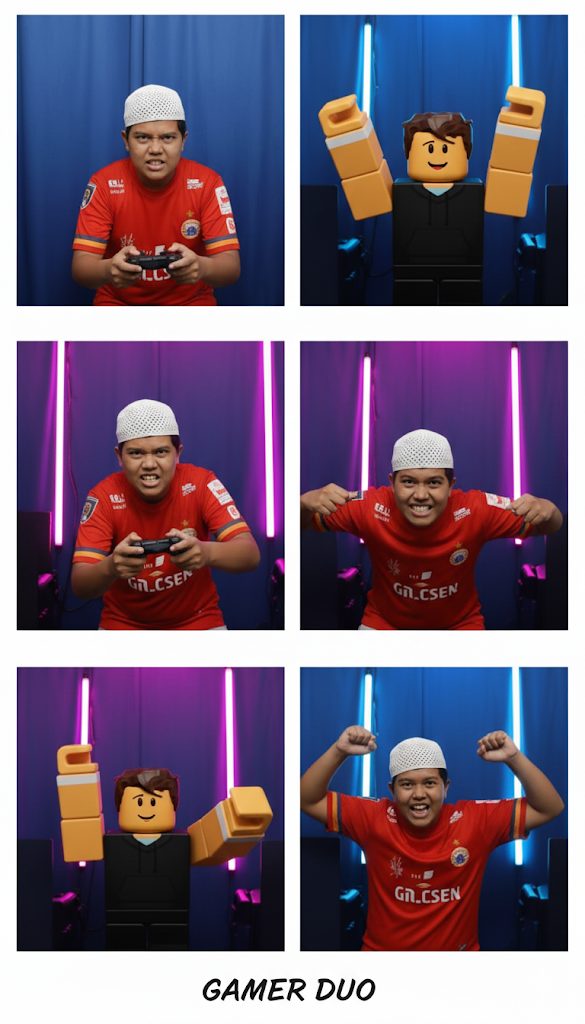
4. Couple Lucu

Menampilkan sisi manis dan romantis bersama avatar.
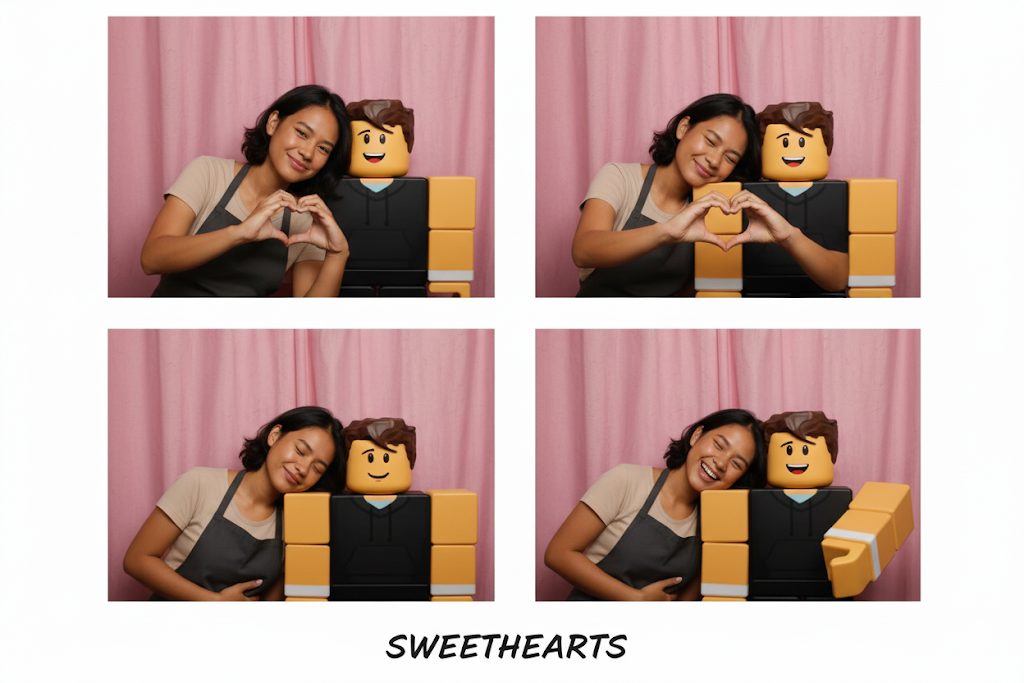
Prompt Gemini AI Couple Lucu

Generate a 4-panel photobooth-style photo strip of the person from the first image and the Roblox avatar from the second image. Make it romantic but playful in a pink curtain background.
– Panel 1: Both smiling together.
– Panel 2: They are making a heart.
– Panel 3: The person is leaning on the avatar’s shoulder.

5. Petualang Seru

Nuansa eksplorasi seperti duo pencari harta karun.

Create a 4-panel photobooth-style photo strip of the person from the first image and the Roblox avatar from the second image. Style it as adventurous explorers.
– Panel 1: Both holding binoculars.
– Panel 2: Pretending to read a treasure map.
– Panel 3: Looking shocked like they found something.
– Panel 4: Doing a superhero pose.

6. Rebahan Santai

Momen chill di akhir pekan yang simpel tapi aesthetic.

Make a 4-panel photobooth photo strip of the person from the first image and the Roblox avatar from the second image. Style it as a cozy, lazy weekend with beige curtain background.
– Panel 1: Both lying down relaxed.
– Panel 2: The person is sipping a drink while avatar copies.
– Panel 3: Both yawning playfully.
– Panel 4: Both giving a chill peace sign.

7. Retro 90-an

Nostalgia dengan gaya klasik yang unik.

Create a 4-panel photobooth-style photo strip featuring the person from the first image and the Roblox avatar from the second image. Use a retro 90s photobooth vibe with pastel curtain background.
– Panel 1: Both giving a thumbs up.
– Panel 2: The person is wearing funny glasses while the avatar laughs.
– Panel 3: They are both showing a goofy surprised face.
– Panel 4: Both holding a cassette tape or making a “cool” pose.

8. Couple Romantis

Lebih sweet dengan nuansa ala photobooth pasangan.

Create a 4-panel photobooth-style photo strip of the person from the first image and the Roblox avatar from the second image. Style it as a romantic couple taking cute photos in a Korean photobooth with pink curtain background.
– Panel 1: Both smiling sweetly at the camera.
– Panel 2: They are forming a heart together with their hands.
– Panel 3: The person is leaning on the avatar’s shoulder.
– Panel 4: Both are laughing together while looking at each other.

9. Sahabat Sekolah

Momen ala teman sekelas di photobox Jepang.

Make a 4-panel photobooth photo strip of the person from the first image and the Roblox avatar from the second image. Style it like two best friends in a Japanese high school photobooth with a white curtain.
– Panel 1: Both are showing peace signs.
– Panel 2: The person is patting the avatar’s head.
– Panel 3: Both are pretending to be shocked.
– Panel 4: They are doing a silly face together.

10. Fun Fair / Karnaval

Meriah dengan suasana karnaval penuh warna.

Generate a 4-panel photobooth-style photo strip of the person from the first image and the Roblox avatar from the second image. Background is a colorful carnival photobooth with balloons.
– Panel 1: Both holding popcorn or pretending to eat snacks.
– Panel 2: They are laughing while pointing at each other.
– Panel 3: The person is holding a toy hammer while the avatar pretends to be hit.
– Panel 4: Both giving peace signs with balloons floating around.

Tips Mengoptimalkan Prompt Gemini AI

  • Gunakan deskripsi detail: semakin rinci instruksi yang diberikan, semakin bagus hasil fotonya.

  • Eksperimen dengan background: ganti warna curtain atau tambahkan elemen dekorasi sesuai selera.

  • Jangan ubah wajah & avatar: selalu sertakan perintah agar AI tidak mengubah identitas asli.

  • Buat variasi pose: deskripsikan 3–4 pose berbeda agar hasil lebih natural.

Dengan kumpulan Prompt Gemini AI di atas, kamu bisa langsung membuat foto ala photobox bareng avatar Roblox sesuai tema yang diinginkan. Setiap hasilnya bisa jadi koleksi pribadi, bahan konten media sosial, atau sekadar seru-seruan bareng teman. (*)